Five surfaces, one conversation — and no shared logic between them
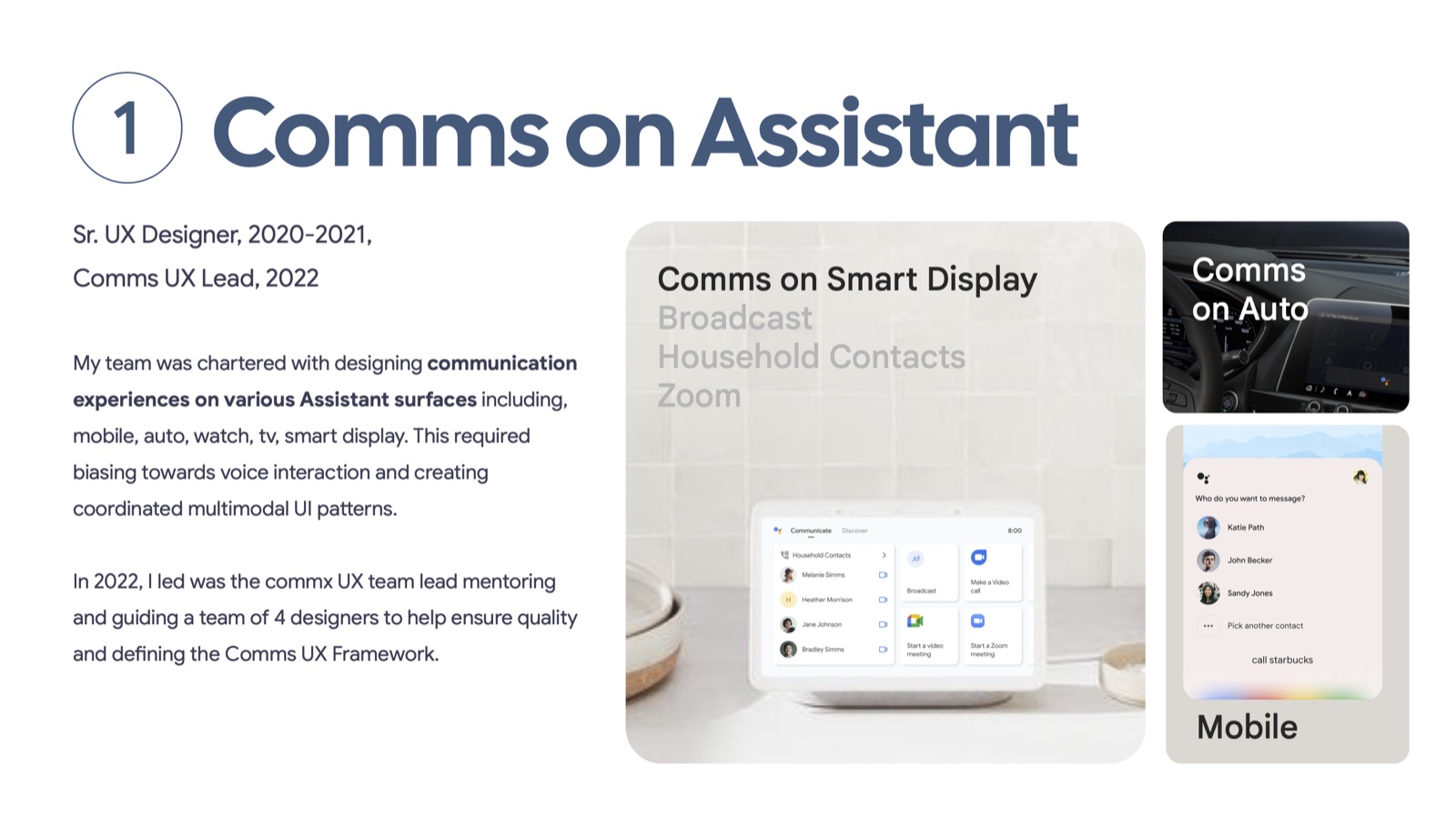
Google Assistant let people call and message across five very different kinds of devices: a phone in your hand, a car dashboard you can't look at for long, a watch with a screen the size of a coin, a TV across the room, and a smart display on the kitchen counter. Each surface has its own balance of voice, touch, and glanceability — and communication is one of the few Assistant use cases where getting it wrong has real consequences: calling the wrong person, or sending a message to the wrong number.
Before a shared framework existed, similar moments — like figuring out which Alex you meant, or how confident Assistant should be before acting — were being solved independently on each surface. That inconsistency was invisible to any one team shipping a single feature, but it meant users got a different Assistant depending on which device they happened to be holding.
From individual surface designer to the team's UX lead
I joined as a senior designer on Comms in 2020 and became the team's UX lead in 2022 — a role I still hold. My team was chartered with designing communication experiences across every Assistant surface, which meant biasing toward voice interaction while still producing coordinated, predictable multimodal UI.
As lead, I mentor and guide other designers, review their work for quality, and own the definition of the Comms UX Framework itself — the shared logic every surface design has to answer to. On Pixel Watch specifically, I was responsible for outlining the key flows and helped lead the other designers through the multi-year effort from concept to shipped quality.
A confidence-tiered framework for deciding when Assistant should just act
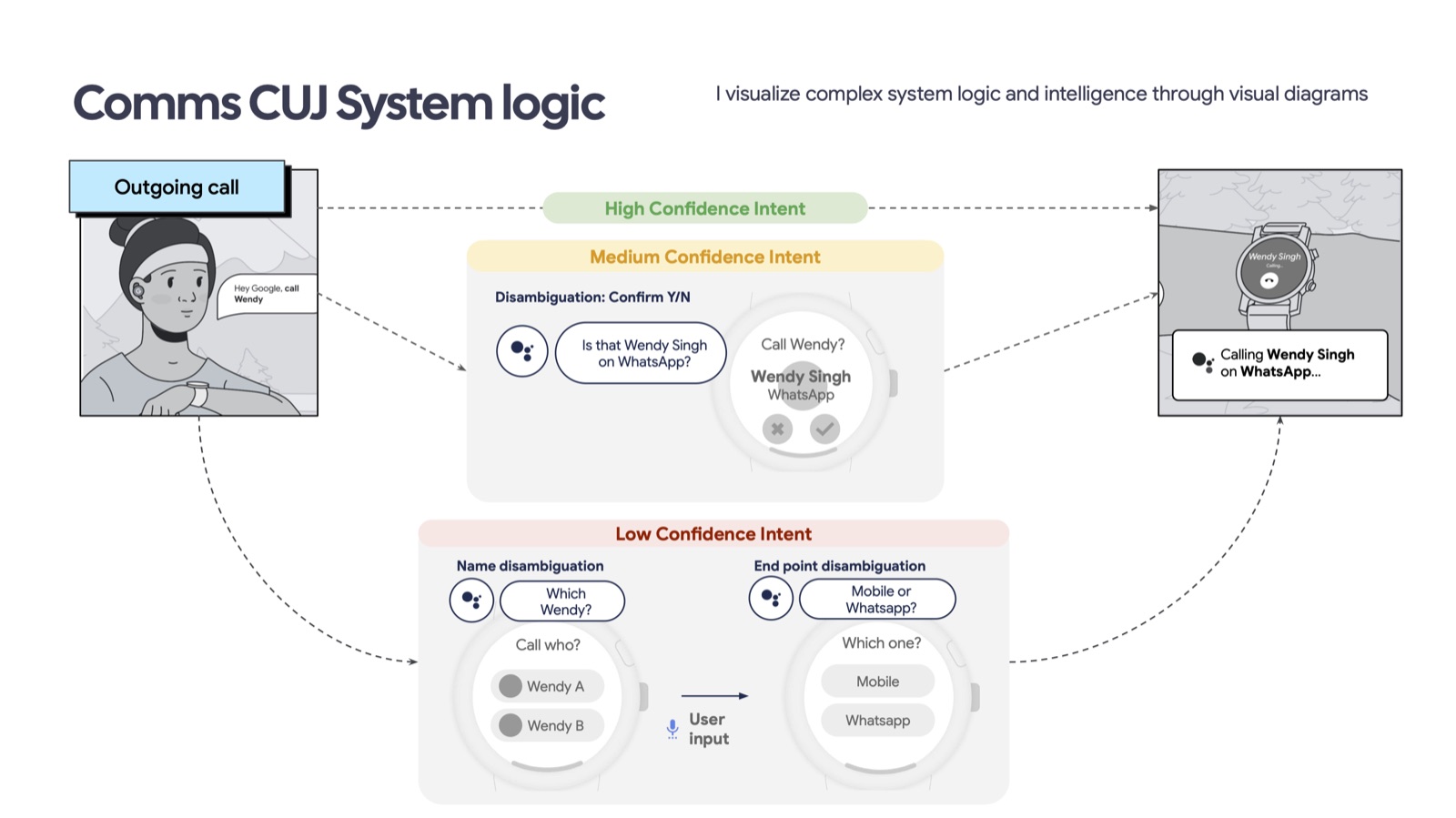
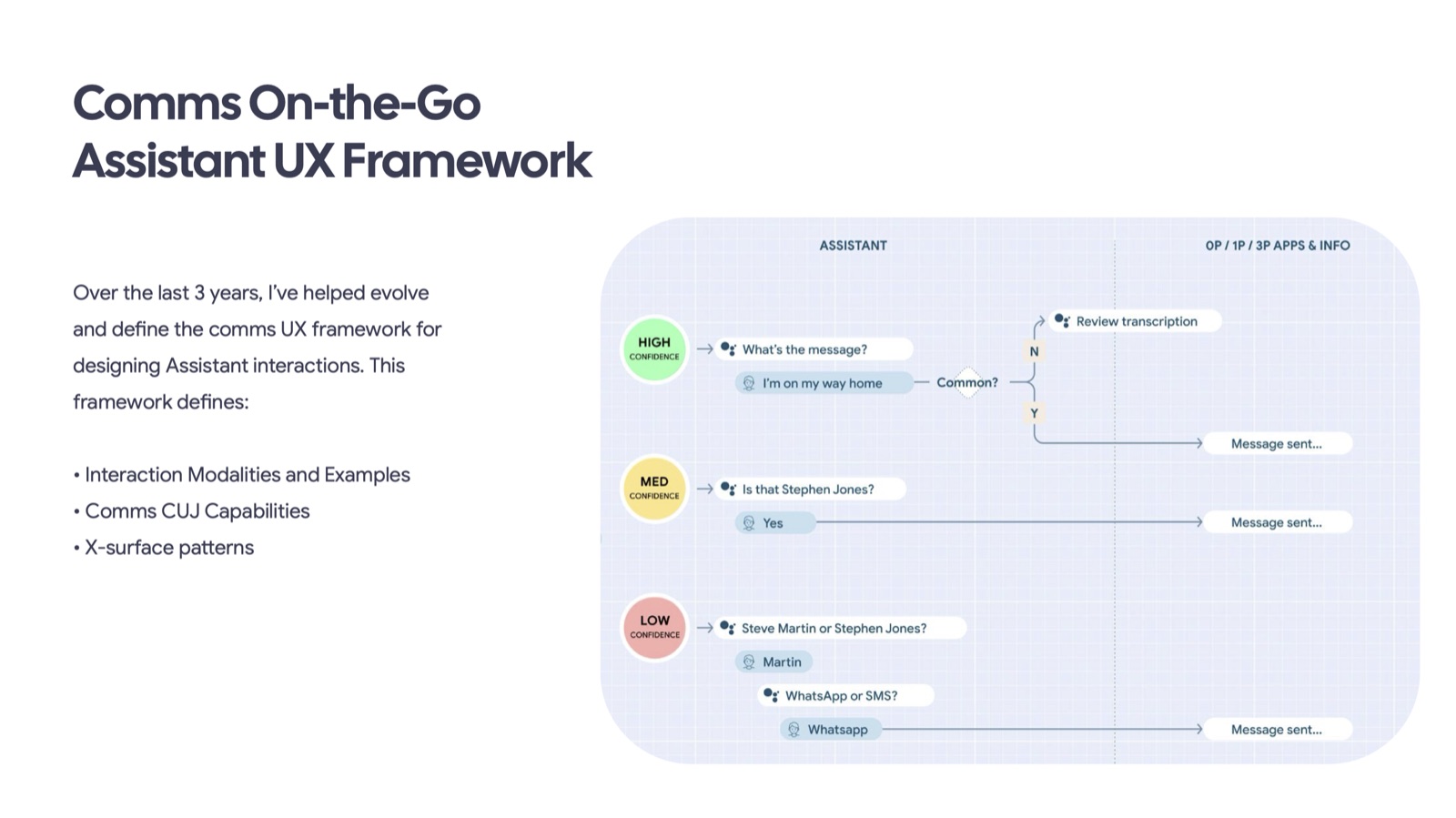
The core of the framework is a simple question, answered consistently everywhere: how confident is Assistant that it understood you, and what should it do about that confidence? I defined three tiers:
- High confidence — Assistant acts immediately ("What's the message?") with no confirmation step.
- Medium confidence — Assistant asks a quick yes/no to confirm before acting.
- Low confidence — Assistant disambiguates explicitly, first by contact name, then by endpoint (mobile vs. WhatsApp vs. work).
Alongside it sits a second, complementary model: a latency framework that defines how UI communicates when the system is working — what a surface shows while Assistant is transcribing, sending, or waiting, so a slow moment never reads as a broken one.
The framework also maps a second axis I defined: where each surface sits on a spectrum from voice-only to visual-only, crossed against nine real device-and-context combinations — earphone, phone-mounted auto, tethered watch, untethered watch, mobile in public, speaker, smart display, TV, and mobile at home. On-the-go CUJs have to work across the full spectrum, not just the voice-only end people assume "on-the-go" means.
The choices that changed the experience
- Voice-first by default, touch as an accelerant. Every flow is designed to complete by voice alone, with touch shortcuts layered on for surfaces that support them — never the reverse.
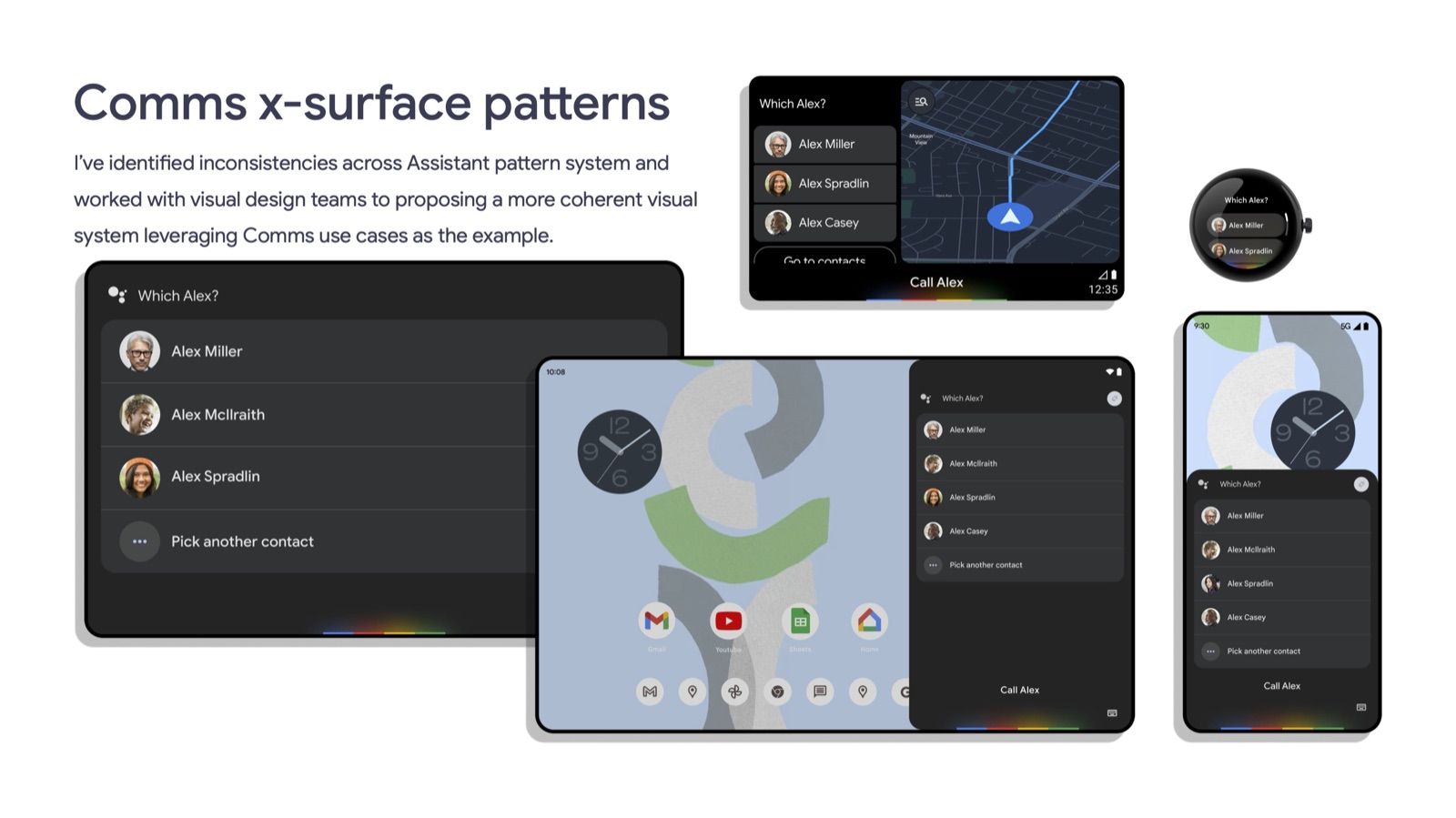
- Disambiguation as a first-class interaction, not an error state. Rather than hiding uncertainty, low-confidence moments became a designed, predictable pattern ("Which Alex?") that appears the same way everywhere.
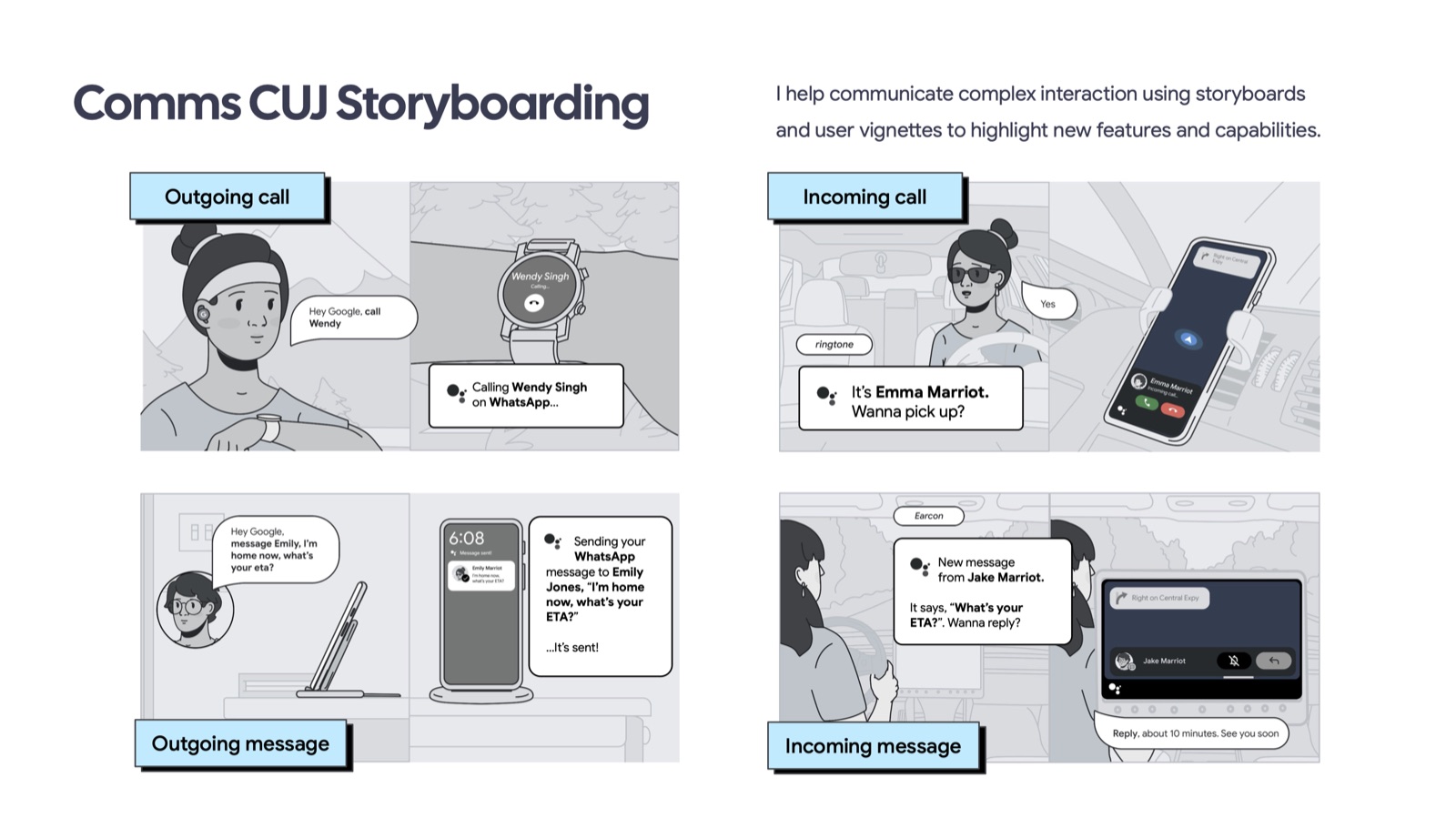
- Storyboards before screens. I communicate new comms capabilities through hand-drawn CUJ storyboards and user vignettes before any UI is built, so engineering and product partners align on the interaction before a single pixel is spent.
One pattern, rebuilt consistently on every surface
I identified inconsistencies across the existing Assistant pattern system and worked with visual design teams to define a coherent cross-surface language, using comms as the proving ground. The same disambiguation moment — "Which Alex?" — now looks and behaves the same way on Auto (both projected and embedded), Watch, Tablet, and Phone, each adapted to its own screen and input model but never reinvented.
That consistency also paid forward into Assistant for Work, where the same disambiguation and confidence logic underpins enterprise actions like scheduling and dial-in.
Where the framework meets the pixel
The framework only matters if it survives contact with real screens. On Android Auto, I designed a modular UI component system for both projected and embedded head units, each step overlaid on a live map without blocking navigation — detailed further in the Android Auto case study. On Smart Displays, I designed content-promotion cards that teach people new voice queries they didn't know Assistant could do, placed alongside the weather and commute cards they already check every morning.
A shared standard for communication
The work established a shared interaction framework for calling and messaging across Assistant surfaces. It connected cross-surface product direction with hands-on design and gave designers a common reference for consistent communication experiences.
New surfaces stopped starting from zero
Before the framework, every new Assistant surface had to re-derive its own answer to "how confident do we need to be, and what happens when we're not?" Now that question is already answered. A new surface — the next watch, the next car system, the next display — inherits a known-good disambiguation pattern and latency model on day one, and the other designers on my team have a shared standard to design against instead of a blank page.